
DPI recommends structured use among other suggestions in new screen time guidelines

The Department of Public Instruction (DPI) has released a document describing what research considers as “purposeful” screen use in schools and guidance on how educators can incorporate it in the classroom.
The guide provides recommendations on how to incorporate screen use in schools for all grade levels. As stated in the guide, there are growing concerns from families regarding how much time students are spending on screen-based activities.
“As technology continues to play an important role in teaching and learning, this guidance encourages schools to move beyond one-size-fits-all approaches to screen time and focus instead on intentional, developmentally appropriate, and purpose-driven use of digital tools,” Matthew Mayo, director of digital teaching and learning and school connectivity at DPI, said in a LinkedIn post. “The resource provides research-informed considerations and practical strategies that support learning, student well-being, and self-regulation.”
 Sign up for the EdDaily to start each weekday with the top education news.
The guide references research that found that both unrestricted and restricted screen use is unhealthy for students. It can lead to sleep disruption, reduced attention span, and mental health concerns. Instead, the guide recommends focusing on the intention behind using the devices and content being consumed by students.
Screen use can be beneficial in deepening engagement and building skills students may need beyond the classroom, the guide says. However it can also take time away from having active discussions with their peers and hands-on activities. Boundaries, clear expectations, and opportunities for students to practice self-regulation can help students build technological habits for the future.
“Skills such as attention management, self-regulation, and purposeful use of technology are essential for success both in the classroom and in life beyond the classroom,” the document says.
The guide also asks educators to consider the implications of passive and active screen use. Passive screen use is when students take in the content with little to no interaction. Active screen use is when students are using a platform to create content or exercise problem solving skills. Both instances can be harmful to students when the activity is unstructured or goes on for longer than it should. While no explicit time limit is mentioned, the guide recommends that screen use have a time limit and discourages endless scrolling.
Krista Glazewski, executive director at the Friday Institute for Educational Innovation, said educators have expressed to them that technology can broaden access to opportunities for students and be a powerful tool for collaboration and creation. However, educators also acknowledge that things like writing, reflection, and movement are still essential.
“That’s one of the strengths of the DPI guidance. It doesn’t treat technology as something to embrace uncritically or avoid altogether. Instead, it gives schools a research-informed framework for asking a better question: ‘What approach will best help students learn in this moment?‘” Glazewski said in an email.
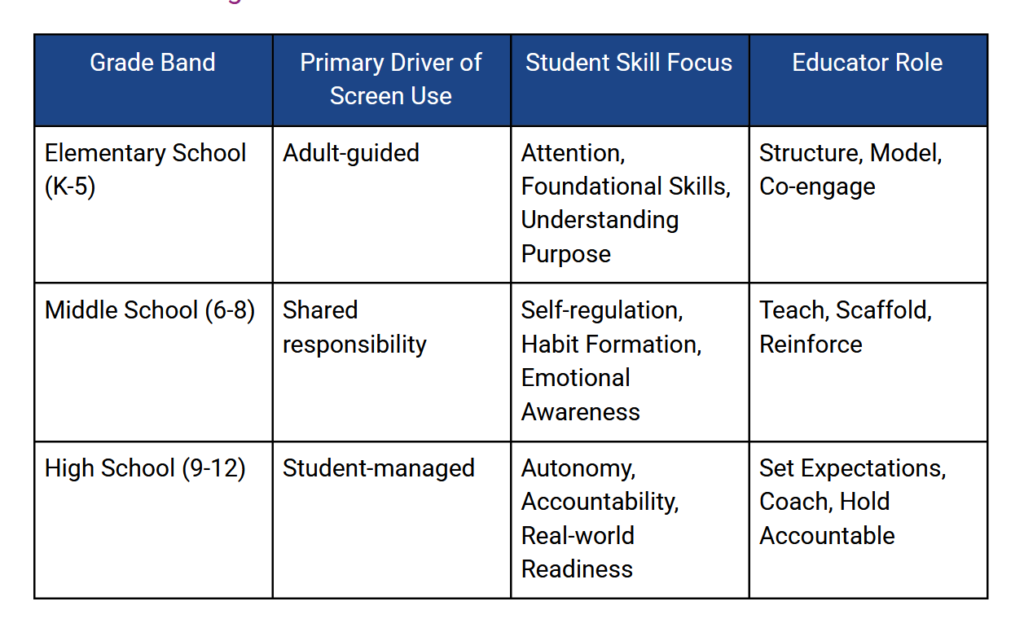
The guide advises that screen use should be heavily directed by adults for younger student, and then supervision tapers off as they age. Here are the recommendations for managing screen use at elementary, middle, and high school levels:
Schools are also advised in the guide to recognize that technology use goes beyond screen-based activities. Students can build technological skills by dabbling in makerspaces, robotics, audio tools, and even assistive technologies, the guide explains.
When implementing screen use guidance at a school, the guide emphasizes the importance of clear and consistent communication. The guide suggests the following:
- Establishing a common language for on-screen and off-screen activities.
- Aligning routines for transitions, focus periods, and device management.
- Allowing flexibility within a shared framework rather than individual classroom rules.
- Supporting administrators in reinforcing expectations across settings.
Glazewski said she appreciated how the guidelines encourage schools to establish coherent expectations while still giving teachers flexibility in the way that they teach.
“Administrators can also create opportunities for teachers to learn from one another. When educators share examples of effective technology integration, discuss what works, and reflect on student engagement, schools develop stronger and more consistent instructional practices,” Glazewski said.
Transparency is not only important for the school’s staff, but with the students’ families. Families should be provided with examples of how screens are used during the day and provided with resources to build consistent habits with students at home, the guide says.
To read more information on how to manage screen use in the classroom and at home, a live link to the guide can be found here.